> For the complete documentation index, see [llms.txt](https://help.theaffiliateplatform.com/llms.txt). Markdown versions of documentation pages are available by appending `.md` to page URLs; this page is available as [Markdown](https://help.theaffiliateplatform.com/reporting/kpis-per-period-tables.md).
# KPIs per period (tables)
The KPIs per period (tables) report provides daily and monthly overview of your KPIs, as well as acquision funnels.
The below Dashboard is accompanied by its' **personal AI Analyst.** Hitting the "AI Analysis" button on the dashboard tab will explore the charts and the tables, outline the positive and the negative points, and suggests the ways to optimize your affiliate program based on the actual data.
## Month-to-Date (MTD)
{% hint style="info" %}
Use the MTD table to identify month-to-month tendencies in main KPIs
{% endhint %}
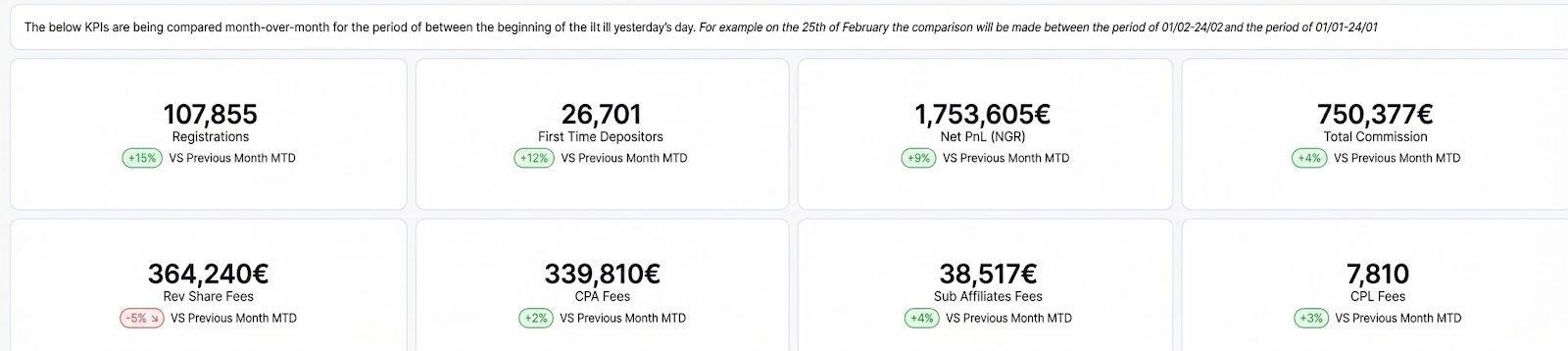
The MTD table consists of set of KPIs, which are being compared month-over-month for the period of between the beginning of the month till yersterday's day.
**How to read it:**\
For example, on 15th of February, the comparison will be made between the period of 01/02-15/02 and the period of 01/01-15/01.\
In the example below:
* There are 107,855 new registrations for the period of 01/02-15/02, which is 15% more than the period 01/01-15/01
## Daily Data
{% hint style="info" %}
Use the daily view to identify spikes, dips, or anomalies in affiliates' performance.
{% endhint %}
The Daily Data table consists of breakdown of affiliate performance day by day for the filtered time period.
**Key Metrics:**
* FTDs - Count of first-time depositors
* QFTDs - Count of qualified first-time depositors (who qualified for CPA commission)
* Deposit Count - Count of deposits
* Deposits Amount (non-FTD) - Amount of deposits that are not first-time deposits
* Deposits Amount (FTD) - Amount of first-time deposits
* Withdrawal Count - Count of withdrawals
* Withdrawal Amount - Amount of withdrawals
* Active Players - Count of players that had either a Bet or a Deposit during the relevant period.
* Volume (Bet Amount)
* PnL (GGR) - GGR, as reported to TAP as final value
* Bonus Amount
* Net PnL (NGR) - NGR, as calculated by TAP based on PnL(GGR) - Bonus - Deductions
* Chargebacks - If reported by platform
* Deductions - If reported by platform
* CPA Fees - Total CPA commission calculated for affiliates
* CPL Fees - Total CPL commission calculated for affiliates
* Rev Share Fees - Total RevShare commission calculated for affiliates
* Sub Affiliate Fees - Total commission from Sub-Affiliates calculated for Parent affiliates
* Total Commission - Sum of CPA Fees + CPL Fees + Rev Share Fees + Sub Affiliate Fees
**Hints:**
* Use the 'Event date' filter to sepcify a time frame for which results will be shown.
* Use 'Date Zoom' filter to control the granularity of the report (how results are grouped by time), as shown below.
## Monthly Data
{% hint style="info" %}
Use the monthly view for high-level performance reviews.
{% endhint %}
The Monthly Data table consists of breakdown of affiliate performance month per month for the filtered time period.
**Key Metrics:**\
Same as Daily Data table
## Activity of Players by Registration Date (Cohort Report)
\
Build your custom cohort report by grouping players based on a shared characteristic, most commonly their **registration date**, to analyze their activity over a later time period.
To do this, use the **Event Date** and **Registration Date** filters together.
* **Event Date** - Filters results based on when the activity occurred
* **Registration Date** - Filters results based on when the player registered.
**Example Insight:**
* If you set **Event Date** between 01-03-2026 and 31-03-2026 and **Registration Date** between 01-02-2026 and 28-02-2026, the report will show **activities that happened in March for players who registered in February**.
## Daily Acquisition Funnel
{% hint style="info" %}
Use the Daily Acquisition Funnel to identify periods with low/high conversions and spot trends amongst players.
{% endhint %}
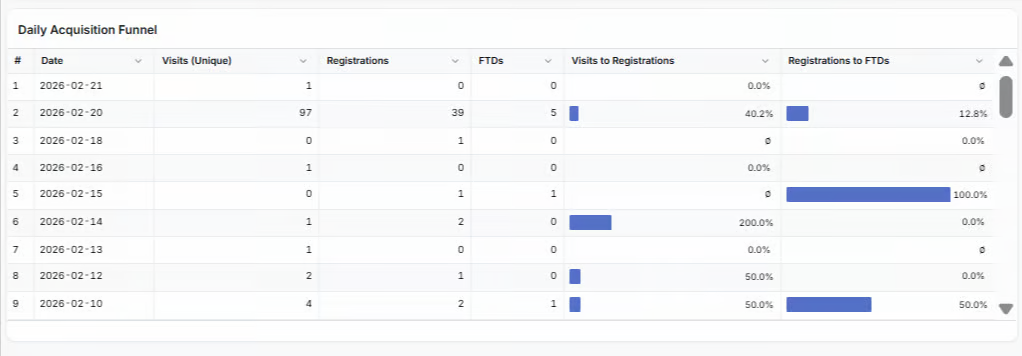
This table provides daily breakdown of player conversions.
**Key Metrics:**
* Visits (Unique) - Count of unique visits, generated via affiliates' tracking links
* Registrations - Number of visitors who registered.
* FTDs - Number of registered players who made their first deposit.
* Conversion Rates:
* Visits to Registrations - Percentage (%) of unique visitors who registered (Count of Registrations divided by Count of Count of unique visits, in %)
* Registrations to FTDs - Percentage (%) of registered players who made an FTD (Count of FTDs divided by Count of Registrations, in %)
## Monthly Acquisition Funnel
{% hint style="info" %}
Use the Monthly Acquisition Funnel to identify months with low/high conversions and spot trends
{% endhint %}
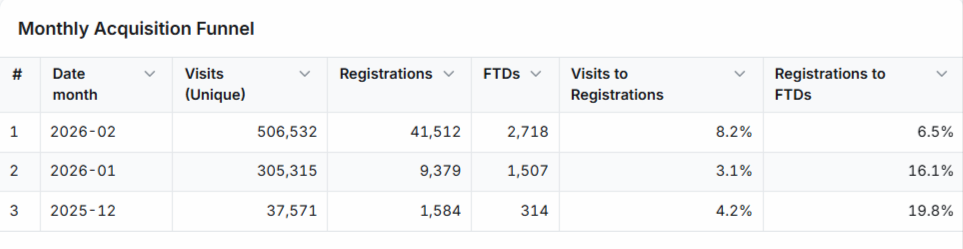
This table provides monthly breakdown of player conversions.\
\
**Key Metrics:**\
Same as Daily Acquisition Funnel
## Important Clarifications
* **Active Players** – Represents count of players that had either a Bet or a Deposit during the relevant period.
* **NaN / Ø** – Indicates no data is available for the period or metric filtered.
* Use the **Date Zoom** to adjust the view to Daily, Weekly, Quarterly or Yearly granularity. \
Once set, this filter is applied to all tables on the page, except the MTD table.
*The MTD (Month-to-Date) table* *has a predefined time frame and always shows month-over-month comparison.*
* Use **Event date** filter to get results that happened in the selected time frime\
Once set, this filter is applied to all tables on the page, except the MTD table. \
*The MTD (Month-to-Date) table has a predefined time frame and always shows month-over-month comparison.*
* Use **Registration date** filter to get results only for players registered in the selected time frame.\
Once set, this filter is applied to all tables on the page, except the MTD table. \
*The MTD (Month-to-Date) table has a predefined time frame and always shows month-over-month comparison.*
---
# Agent Instructions
This documentation is published with GitBook. GitBook is the documentation platform designed so that both humans and AI agents can read, navigate, and reason over technical content effectively. Learn more at gitbook.com.
## Querying This Documentation
If you need additional information that is not directly available in this page, you can query the documentation by asking a question.
Perform an HTTP GET request on the following URL with the `ask` and `goal` query parameters:
```
GET https://help.theaffiliateplatform.com/reporting/kpis-per-period-tables.md?ask=&goal=
```
`ask` is the immediate question: it should be specific, self-contained, and written in natural language.
`goal` is what the user is ultimately trying to achieve, the reason they need the answer. Sharing it helps GitBook give you a better, more relevant answer. A goal is most helpful when it describes the outcome the user wants rather than restating the question. For example, with `ask=how do I create an API token`, a goal like `automate deployments from our CI pipeline` lets GitBook tailor the answer to that use case.
The response will contain a direct answer to the question and relevant excerpts and sources from the documentation.
Use this mechanism when the answer is not explicitly present in the current page, you need clarification or additional context, or you want to retrieve related documentation sections.
 ## Month-to-Date (MTD)
{% hint style="info" %}
Use the MTD table to identify month-to-month tendencies in main KPIs
{% endhint %}
The MTD table consists of set of KPIs, which are being compared month-over-month for the period of between the beginning of the month till yersterday's day.
## Month-to-Date (MTD)
{% hint style="info" %}
Use the MTD table to identify month-to-month tendencies in main KPIs
{% endhint %}
The MTD table consists of set of KPIs, which are being compared month-over-month for the period of between the beginning of the month till yersterday's day.