> For the complete documentation index, see [llms.txt](https://help.theaffiliateplatform.com/llms.txt). Markdown versions of documentation pages are available by appending `.md` to page URLs; this page is available as [Markdown](https://help.theaffiliateplatform.com/reporting/analysis.md).
# Analysis
Cohort Reports provide insights into player deposit behavior over time, acquisition quality and trends based on player seniority and first-time deposit activity.
The below Dashboard is accompanied by its' **personal AI Analyst.** Hitting the "AI Analysis" button on the dashboard tab will explore the charts and the tables, outline the positive and the negative points, and suggests the ways to optimize your affiliate program based on the actual data.
## Deposit Cohort
\
**What is it:** \
\
The Deposit Cohort tracks deposit activity among acquired players during the first month of activity and follows their deposit contribution in the following months.\
\
**Why it matters:**
* Identify affiliates whose players keep depositing over time
* Spot affiliates with fast deposit decay and optimize deals to reflect true value.
**How to read it:**
As shown in the cohort table below, players who **registered in 12/2024** generated the following deposit activity:
> $ 30,741,581 total deposit amount in same month as registration month (02/2026)\
> \
> $ 22,343,699 total deposit amount in the first month following registration month (03/2026)\
> \
> $ 11,545,836$ total deposit amount in the same month as registration month (03/2026)
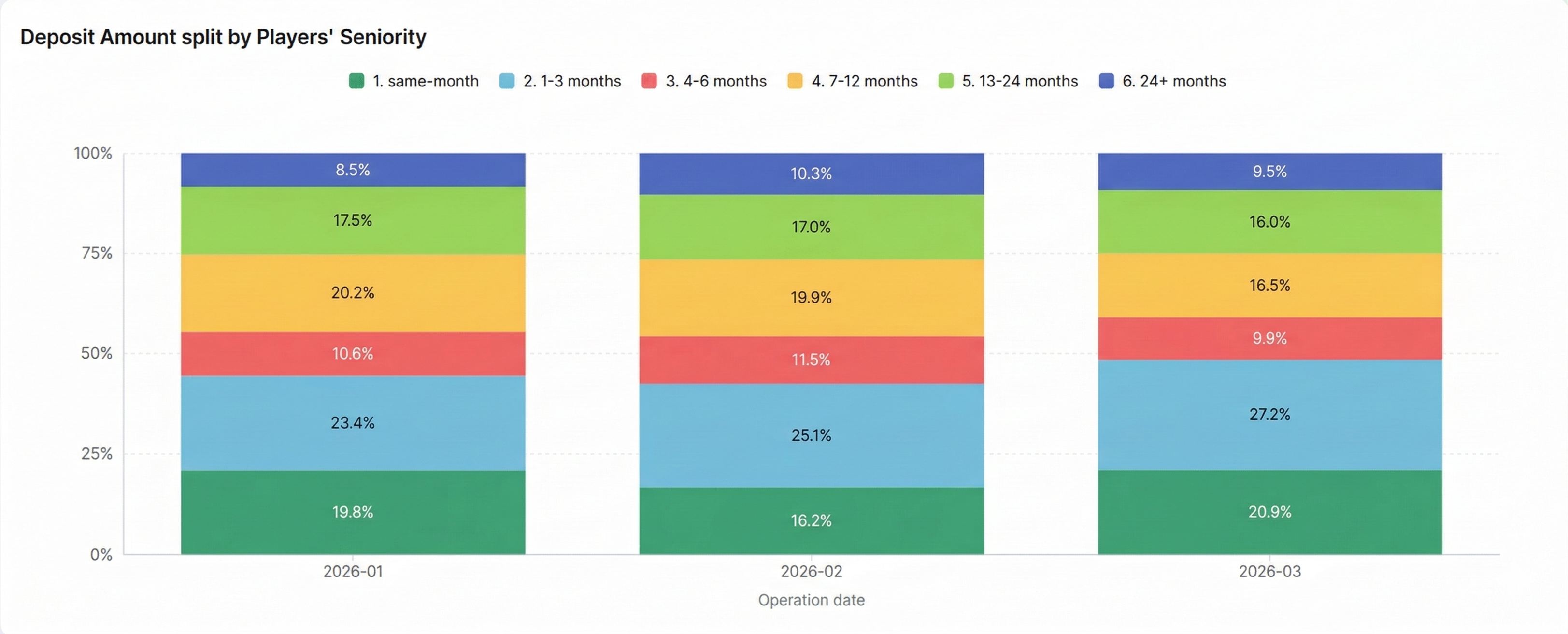
## Deposit Amount split by Players' Seniority
\
**What is it:** \
\
The table tracks the monthly deposit activity contribution, split by the users' seniority (between the registration month and the activity month)\
\
**Why it matters:**
* Highlights trends that impact revenue sustainability of acquired traffic.
* Recognize trends such as strong initial deposits followed by drop-offs or consistent long-term activity.
**How to read it:**
* The Y-axis represents the percentage of total deposit amount for the given month, scaled from 0% to 100%.
* The X-axis lists the specific months based on your filters
* The stacked bars for each month show the deposit contribution for different seniority categories:
* **same-month** (Dark Green): Deposits from players who registered in same month.
* **1-3 months** (Light Blue): Deposits from players who have registered in the past 1 to 3 months.
* **4-6 months** (Red): Deposits from players who have registered in the past 4 to 6 months.
* **7-12 months** (Yellow): Deposits from players who have registered in the past 7 to 12 months.
* **13-24 months** (Light Green): Deposits from players who have registered in the past 13 to 24 months
* **24+ months** (Dark Blue): Deposits from players who have registered in the past more than 24 months.
**Hint**
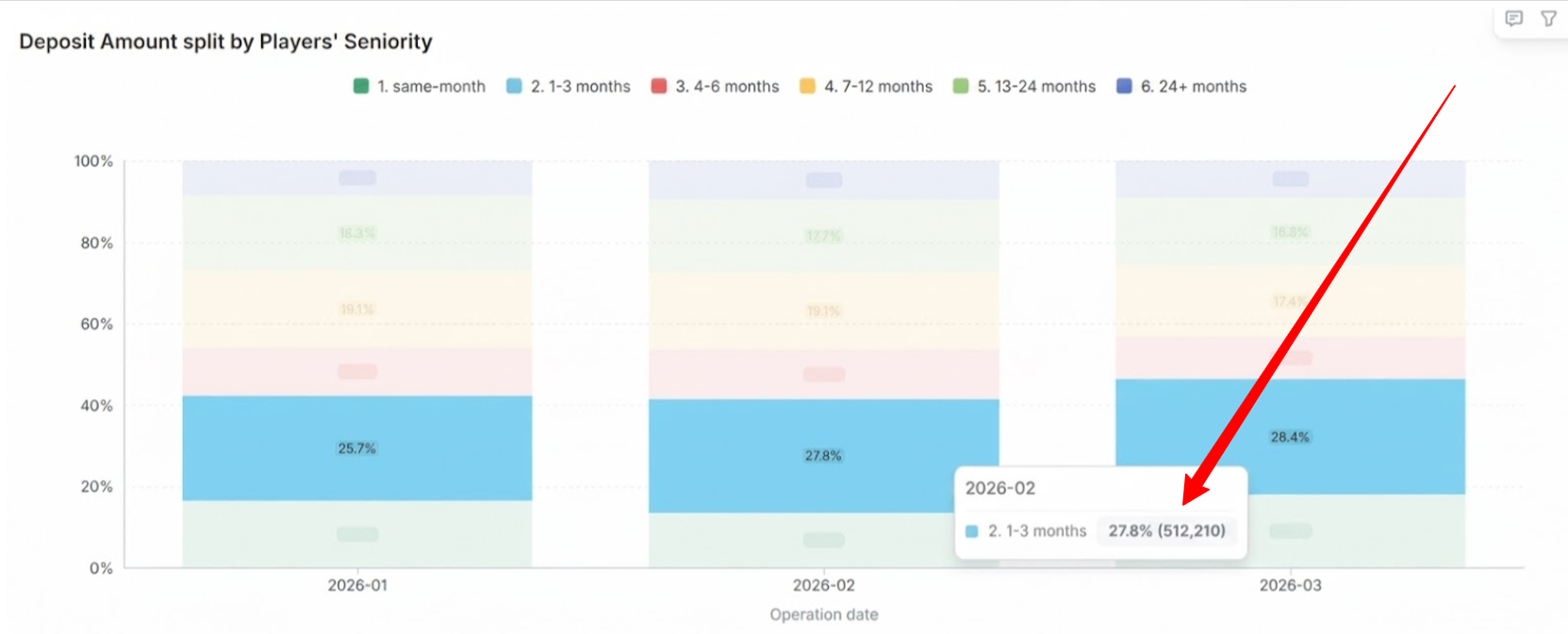
* Hover over a bar to see the deposit amount in a specific seniority category or hover over the month column to see the deposits amount in each seniority categry in the given month
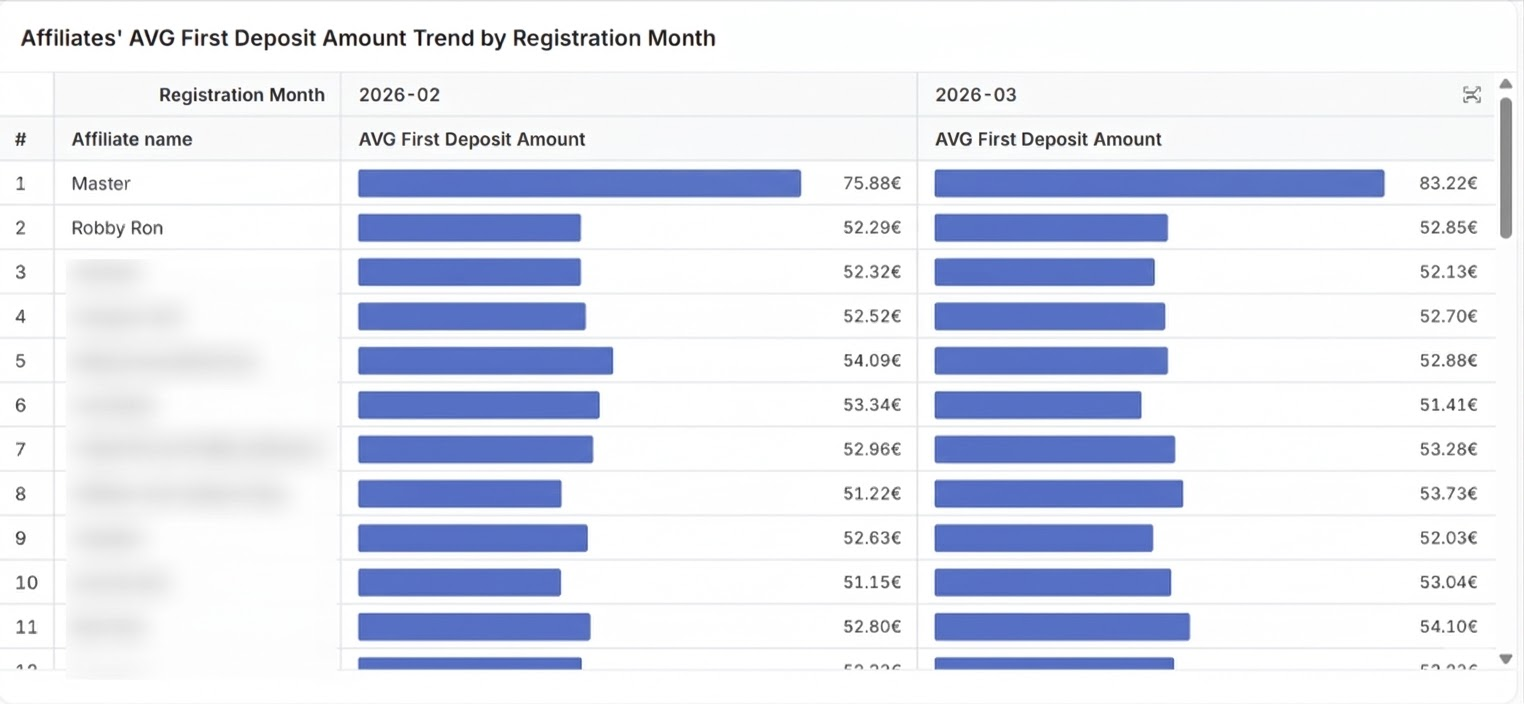
Affiliates' AVG First Deposit Amount Trend by Registration Month
---------------------------------------------------------------------
**What is it:** \
\
This table shows the acquisition quality trend for each affiliate using the **average first deposit amount (FTD)** as the main indicator.
\
**Why it matters:**
* Evaluate which affiliates bring players who start with higher deposits, and how this behavior evolves month by month.
**How to read it:**
* The left column lists the affiliates by 'Affiliate name'
* The top row shows the players' registration months (based on the selected filters)
* **AVG First Deposit Amount:** Average amount of all FTDs made by players recruited by each affiliate during that particular month.
\
To analyze an affiliate, read across their specific row.
---
# Agent Instructions
This documentation is published with GitBook. GitBook is the documentation platform designed so that both humans and AI agents can read, navigate, and reason over technical content effectively. Learn more at gitbook.com.
## Querying This Documentation
If you need additional information that is not directly available in this page, you can query the documentation by asking a question.
Perform an HTTP GET request on the following URL with the `ask` and `goal` query parameters:
```
GET https://help.theaffiliateplatform.com/reporting/analysis.md?ask=&goal=
```
`ask` is the immediate question: it should be specific, self-contained, and written in natural language.
`goal` is what the user is ultimately trying to achieve, the reason they need the answer. Sharing it helps GitBook give you a better, more relevant answer. A goal is most helpful when it describes the outcome the user wants rather than restating the question. For example, with `ask=how do I create an API token`, a goal like `automate deployments from our CI pipeline` lets GitBook tailor the answer to that use case.
The response will contain a direct answer to the question and relevant excerpts and sources from the documentation.
Use this mechanism when the answer is not explicitly present in the current page, you need clarification or additional context, or you want to retrieve related documentation sections.